
Getting your business noticed online requires more than just a great website. For local businesses, leveraging the LocalBusiness Schema is absolute. This structured data markup helps search engines understand your business details, improving your chances of appearing in local search results.
This guide will explore everything you need to know about LocalBusiness Schema, including its benefits, how to implement it, and best practices.
What is LocalBusiness Schema?
The LocalBusiness Schema is a structured data markup provided by Schema.org that helps search engines understand essential information about your local business. By implementing LocalBusiness Schema, you can improve:
- your local SEO
- enhance your business’s visibility in search results
- provide customers with the critical details
What LocalBusiness Schema Covers
LocalBusiness Schema is a type of structured data that provides detailed information about a business, such as:
- Business name: Your official name as it appears online.
- Address: Your full physical address, formatted using the
PostalAddressschema. - Phone number: A direct number where customers can reach you.
- Operating hours: Days and times when your business is open.
- Geo-coordinates: Latitude and longitude to help with map accuracy.
- Reviews and ratings: Customer feedback displayed alongside your business details.
By implementing LocalBusiness Schema, you’re also enhancing the customer experience. When users see clear, consistent information about your services, they’re more likely to engage with your business. Next, let’s examine the specific benefits of LocalBusiness Schema and why it’s a must-have for your local SEO strategy.

This schema is particularly valuable for businesses that rely on local customers. For instance, when someone searches for “best dentist near me,” Google uses structured data to identify and showcase businesses that meet the criteria.
By including LocalBusiness Schema, you can ensure that your business appears in rich snippets, Knowledge Panels, and Google Maps, complete with accurate details.
An Example of LocalBusiness Schema
For instance, when a user searches for “bakery near me,” Google can pull the bakery’s structured data and display rich results like this:
- Name: Sarah’s Bakery
- Address: 123 Elm Street, Boston, MA
- Rating: ⭐⭐⭐⭐ 4.5/5 (50 reviews)
This enhanced visibility builds trust with customers and increases click-through rates. When added to your website’s HTML, search engines like Google, Bing, and Yahoo can display this information in rich results, such as Knowledge Panels or Google Maps listings.
Why is LocalBusiness Schema Important?
In the world of local SEO, standing out requires more than just a website. LocalBusiness Schema provides a strategic advantage by making your business’s details more visible, engaging, and accurate in search results. Whether it’s a rich snippet that displays your hours or a Knowledge Panel with your contact details, this schema helps you grab attention and drive traffic.
The Biggest Advantage of LocalBusiness Schema
One of the biggest advantages of LocalBusiness Schema is its ability to generate rich snippets. These enhanced search results often include reviews, photos, and additional information, making your listing more appealing to users. According to Backlinko, rich snippets can increase click-through rates by 20–30%. Furthermore, businesses with properly implemented structured data are more likely to appear in Google’s Local Pack, a highly visible section featuring the top three local businesses for a given search.
But there are other benefits to improving LocalBusiness Schema.
Deeper Dive into the Benefits of LocalBusiness Schema
Structured data helps search engines better understand your business’s services, location, and relevance to local search queries, which increases the likelihood of appearing in top local search results.
- Improved visibility: Makes it easier for customers to find your business in search results and Google Maps.
- Enhanced engagement: Rich snippets and Knowledge Panels encourage users to click and interact with your business.
- Greater trust: Displaying accurate details and positive reviews builds confidence among potential customers.
- Voice search optimization: Helps your business rank better for voice search queries like “Where is the closest coffee shop?”
It’s about building trust and providing users with the information they need to choose your business. With benefits ranging from better search rankings to higher engagement, it’s a vital tool for any local business. Let’s now dive into how you can implement this schema on your website.
Benefit #1. Boosting Local SEO
Statistics show that 76% of people who search for something nearby on their smartphone visit a business within a day (Source: HubSpot). By implementing LocalBusiness Schema, you provide search engines with precise details about your location and services, increasing your likelihood of appearing in Google’s Local Pack or Google Maps results.
“LocalBusiness Schema bridges the gap between how businesses describe themselves and how search engines understand them,” explains SEO expert Brian Dean.
Benefit #2. Improves Rich Snippets
Have you noticed search results with extra information, such as customer reviews, operational hours, or pricing? That’s the power of structured data. Rich snippets generated from LocalBusiness Schema make your listing more prominent and engaging.
Google may use this schema to create rich snippets, providing users with additional business details directly in the search results, making your listing stand out.
Benefit #3. Drives Customer Engagement
BrightLocal reports that 87% of consumers read online reviews, and showcasing them can make your business more appealing. A business with accurate, detailed listings inspires confidence in potential customers. By showcasing your operational hours, pricing, and reviews, you make it easy for customers to choose your business over competitors.

By providing accurate and comprehensive details, users can find your business’s key information faster, such as operational hours or directions.
Benefit #4: Voice search optimization
With the rise of virtual assistants like Siri, Alexa, and Google Assistant, voice search has become a key way consumers find local businesses. According to BrightLocal reports that 58% of consumers use voice search to find local businesses, making structured data a critical tool for staying competitive in the digital age. By implementing LocalBusiness Schema, you can optimize your website for voice search and ensure your business is included in voice-generated results.
LocalBusiness Schema provides structured data that virtual assistants rely on to deliver fast, accurate answers. For example, when someone asks, “Where is the nearest pizza place?” assistants pull data such as business name, address, phone number, and hours of operation directly from schema markup. Without properly formatted schema, your business might be overlooked in favor of competitors who provide better-structured information.
By optimizing for voice search through LocalBusiness Schema, you ensure that your business is easily discoverable for voice-based queries. As voice search continues to grow, businesses that leverage structured data will stay ahead of the competition. This makes LocalBusiness Schema not just a critical strategy for staying relevant in an increasingly voice-driven world.
Key Properties of LocalBusiness Schema
make the most of LocalBusiness Schema, it’s important to understand the key properties that define it. These elements allow search engines to provide accurate and detailed information about your business to potential customers.
Some of the most important properties include:
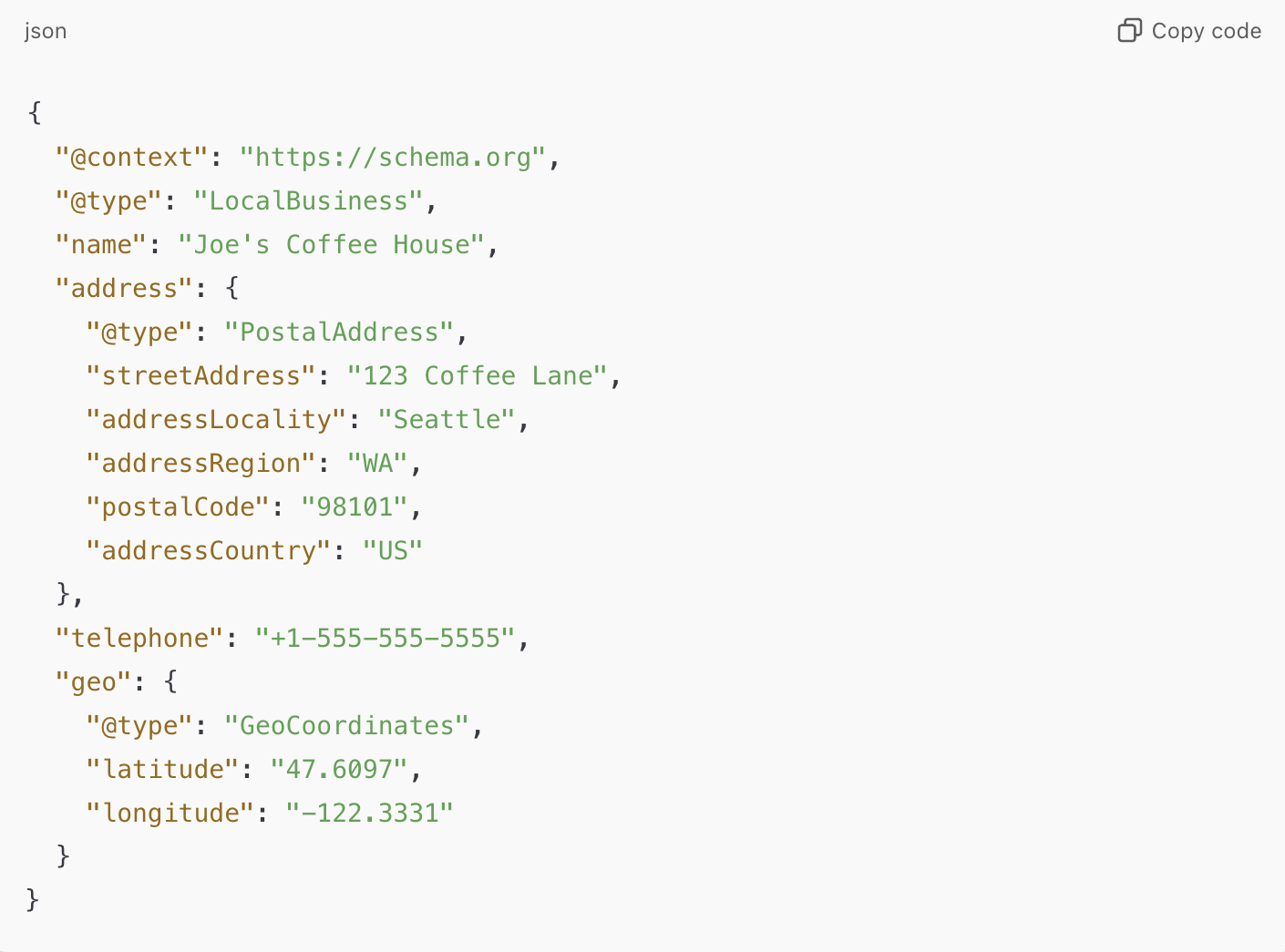
@type: Defines the type of business, such asRestaurant,Store, orDentist.name: Your business’s official name.address: Your location, formatted using thePostalAddressschema.telephone: A phone number customers can use to contact you.geo: Latitude and longitude coordinates for your business, which help with map results.aggregateRating: Your average customer rating and the number of reviews.
For example, if you run a coffee shop, your schema might look like this:
Required Fields
@type: The type of schema. For local businesses, it should beLocalBusinessor a subtype such asRestaurant,Store, orDentist.name: The name of your business.address: The physical address using the PostalAddress Schema.telephone: Your business’s phone number.
Recommended Fields
url: The business’s website URL.geo: Latitude and longitude coordinates.openingHours: Business hours in the format"Mo-Fr 09:00-17:00".priceRange: A short representation of your pricing, e.g.,$$.
Optional Enhancements
aggregateRating: Include customer ratings with theaggregateRatingproperty.review: Display customer reviews using theReview Schema.image: Provide an image URL for your business.
By including these properties in your LocalBusiness Schema, you ensure search engines can accurately represent your business to users. Up next, we’ll walk you through the step-by-step process of adding schema markup to your website.
How to Implement LocalBusiness Schema
Adding LocalBusiness Schema to your website might sound complicated, but it’s easier than you think. With the right tools and guidance, you can implement it in just a few steps.
Follow these steps to get started:
- Define Your Business Type: Choose the most specific LocalBusiness subtype for your industry (e.g.,
Restaurant,MedicalClinic). - Generate the Markup: Use tools like Google’s Structured Data Markup Helper to create JSON-LD code.
- Add the Code to Your Website: Embed the markup in your site’s
<head>or<body>section. If you use WordPress, plugins like Yoast SEO can simplify this step. - Validate Your Schema: Use Google’s Rich Results Test to ensure your markup is error-free.
Real-world examples show the impact of schema. For instance, a local spa in Austin, TX, saw a 42% increase in local search visibility within three months of implementing LocalBusiness Schema. By following these steps, you can set up LocalBusiness Schema on your website and start reaping the benefits. The final section will highlight best practices to maximize your schema’s effectiveness.
Best Practices to Follow
Implementing LocalBusiness Schema is only part of the equation. To ensure it remains effective, you need to follow best practices for maintaining and optimizing your schema. This involves keeping your data accurate, using advanced features, and aligning your schema with broader SEO strategies.
Here are some tips to keep in mind:
- Keep Information Consistent: Ensure your schema matches the details on your website and Google My Business profile.
- Leverage Reviews: Use the
aggregateRatingproperty to highlight customer feedback. Positive ratings increase trust and engagement. - Update Regularly: Whenever your hours, location, or other business details change, update your schema to reflect the changes.
- Use Subtypes: If applicable, use specific subtypes like
FoodEstablishmentorHealthAndBeautyBusinessfor greater accuracy - Leverage plugins: Use tools like Yoast SEO for easier implementation and management.
By following these best practices, you ensure that your schema remains accurate, effective, and optimized for local SEO. Over time, this attention to detail will drive more traffic, improve customer trust, and set your business apart from competitors.
Conclusion for Boosting Your Local SEO
Implementing LocalBusiness Schema is a powerful tool for boosting your local SEO, but its true potential lies in how well it’s maintained and optimized over time. A one-time setup isn’t enough to stay competitive; instead, businesses must follow proven strategies to keep their structured data relevant and effective. These best practices can help ensure your schema remains a key asset in attracting local customers and enhancing your online visibility.
Updating your schema regularly is also essential—whether you’re changing your hours for holidays or adding new services, accurate and current information ensures customers always know what to expect.

 Freelance Web Writer
Leave a comment